Your AI agents, grounded in clean knowledge

TensorLot is an MCP server. Connect Copilot Studio, Claude, or any agent framework to your curated SharePoint knowledge — governed, permission-aware, and audit-logged.

MCP (Model Context Protocol) is the open standard that lets an AI agent call external tools — one plug, any agent.

At a glance
Interface
MCP / REST
Endpoint
1 · one key
Tools
11 · default-deny
Token usage
−70%
Calls logged
100%

the problemAgents are only as good as what they read.

You've seen what happens when Copilot answers from five conflicting versions of the same procedure. Connecting agents directly to raw SharePoint doesn't fix data quality — it scales the problem. TensorLot sits in between: agents query the cleaned, deduplicated, contradiction-checked knowledge layer instead of the raw file share.

TodayRaw SharePoint
  • 5 versionsof the same procedure
  • Duplicatesin forgotten sites
  • 2019 copiesstill ranking first
  • Dead linksto retired systems
In betweenTensorLot
Knowledge layer · MCP server
  • Deduplicated
  • Contradiction-checked
  • Scoped per agent
  • Cited answers
Your agentsAny MCP client
  • Copilot StudioMicrosoft
  • ClaudeAnthropic
  • Custom frameworksLangGraph, Cursor, …
One endpoint
1endpoint, one key
11governed tools
−70%tokens per answer

mcp serverFour tools. One endpoint.

Every tool is scoped to a defined knowledge space and switched on per agent — default-deny.

ask · search_documents
Search & Answer

Agents search documents semantically and get grounded answers with citations — the same retrieval as Tensor Bot, scoped to a defined knowledge space.

list_findings · get_finding
Findings on tap

Agents query quality findings — duplicates, contradictions, outdated content — and report them where your teams work: Teams, Slack, ticketing.

set_document_action
Act, not just read

Agents set document statuses and trigger governed actions — archive, resolve — every step audit-logged. TensorLot never writes to SharePoint itself; the agent acts with the user’s rights.

action rules
Action Rules

Define once what “archive” means per URL prefix, library, site or tenant — most specific wins. Agents follow your rules instead of improvising.
how it worksLive in three steps.

01
Create
Create the agent, scope its knowledge
Pick the sites, libraries or topics this agent may see. Least privilege by default — tools are off until you switch them on.
  • Defined knowledge space
  • Default-deny tool list
  • Accountable owner
02
Connect
Connect via MCP
One endpoint, one key. Works with Copilot Studio, Claude and any MCP-compatible framework. No custom integration code.
  • MCP or REST
  • Keys expire, revoke anytime
  • Minutes, not sprints
03
Go live
Test in the Playground, then ship
Dry-run over the real MCP endpoint, watch every tool call in the trace, then go live. Every call lands in the audit log.
  • Dry-run safe
  • Tool-call trace
  • Audit log per call
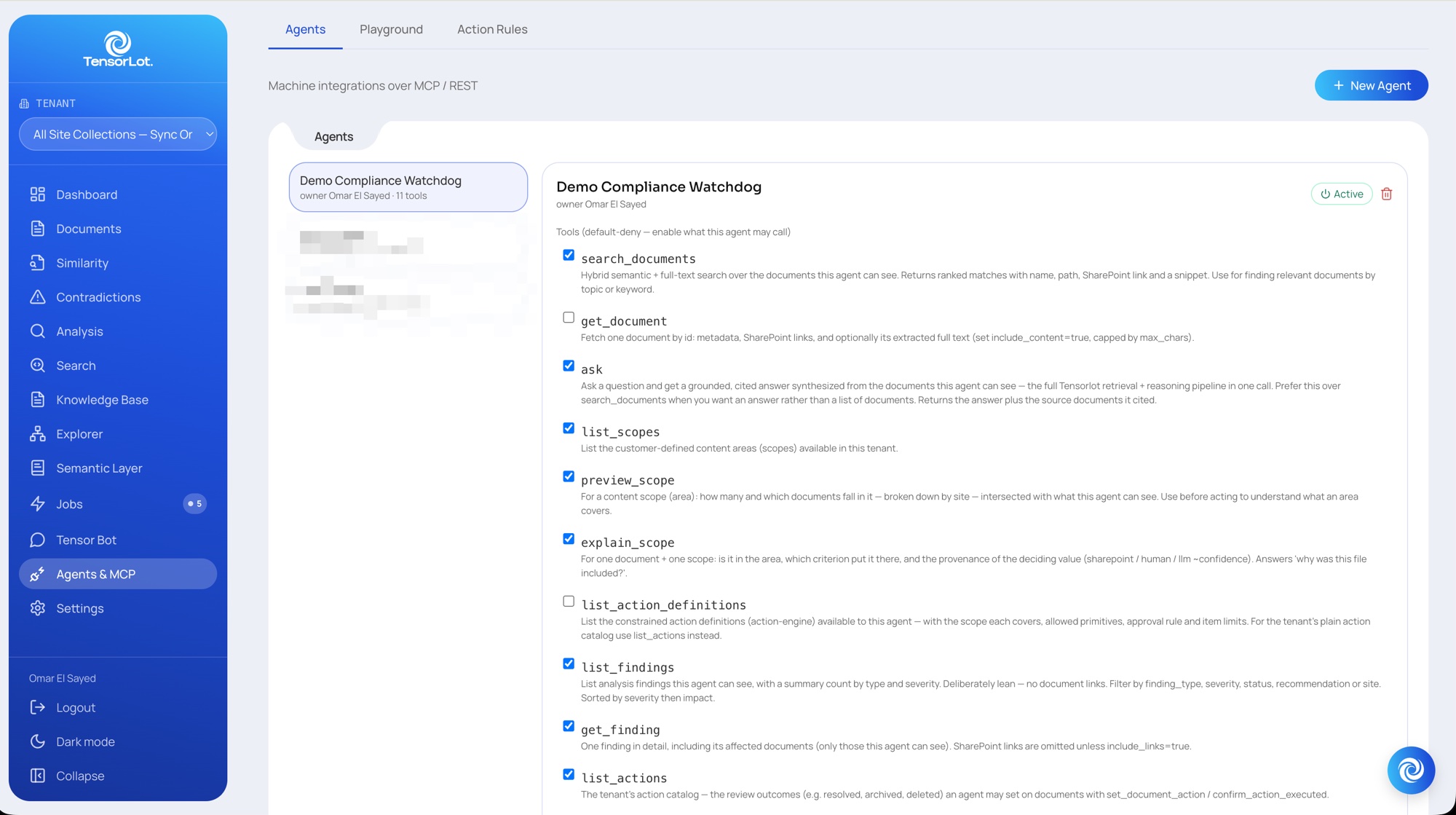
Agents · default-deny toolsconsole / agents & mcp / agents
TensorLot console — Agents tab: default-deny tool allow-list for the agent “Demo Compliance Watchdog”

Enable only the tools this agent may call — search_documents, ask, list_findings, set_document_action …
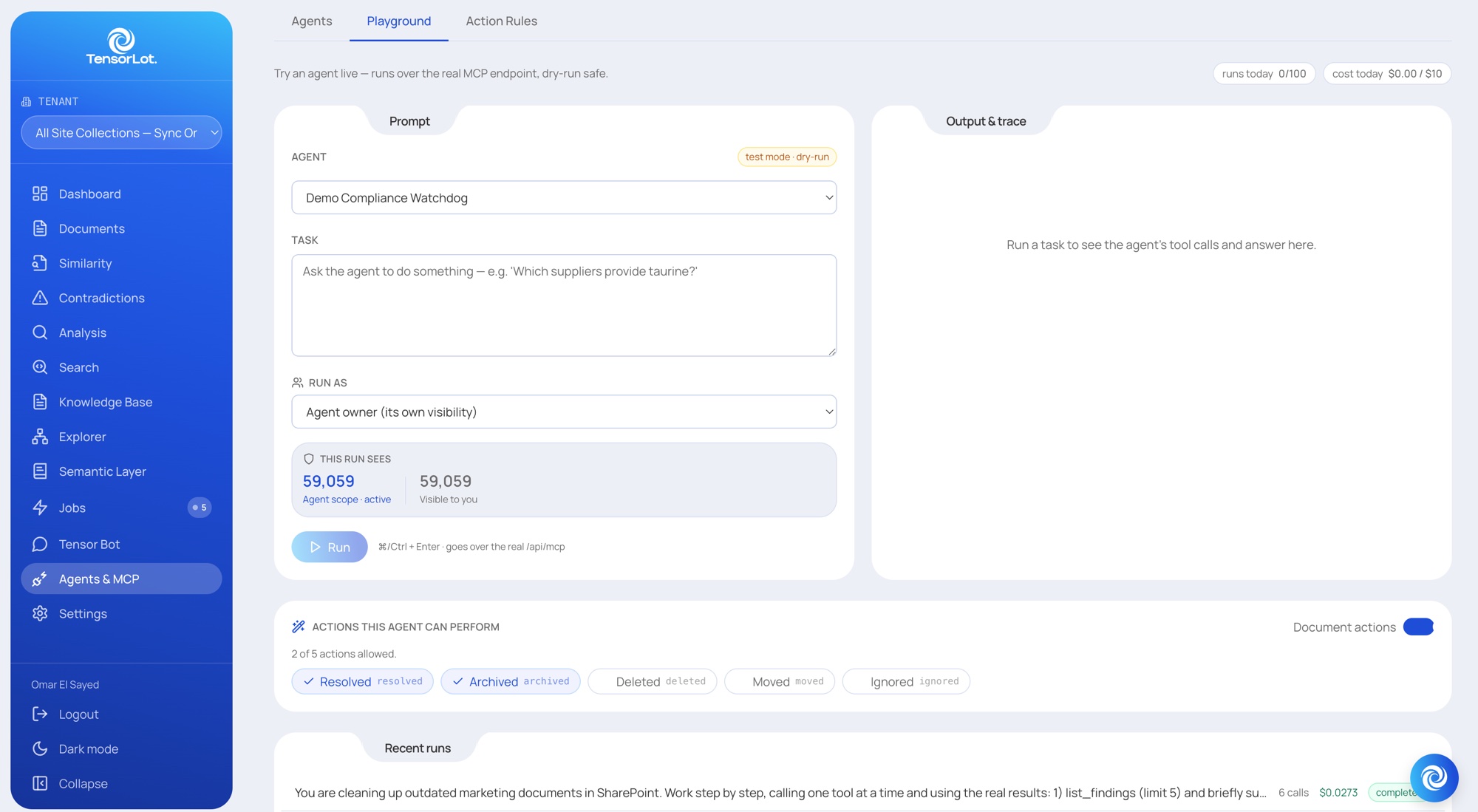
Playground · dry-runconsole / agents & mcp / playground
TensorLot console — Playground: dry-run a task over the real MCP endpoint, with scope and allowed actions

Runs over the real MCP endpoint — this run sees 59,059 documents, 2 of 5 actions allowed.
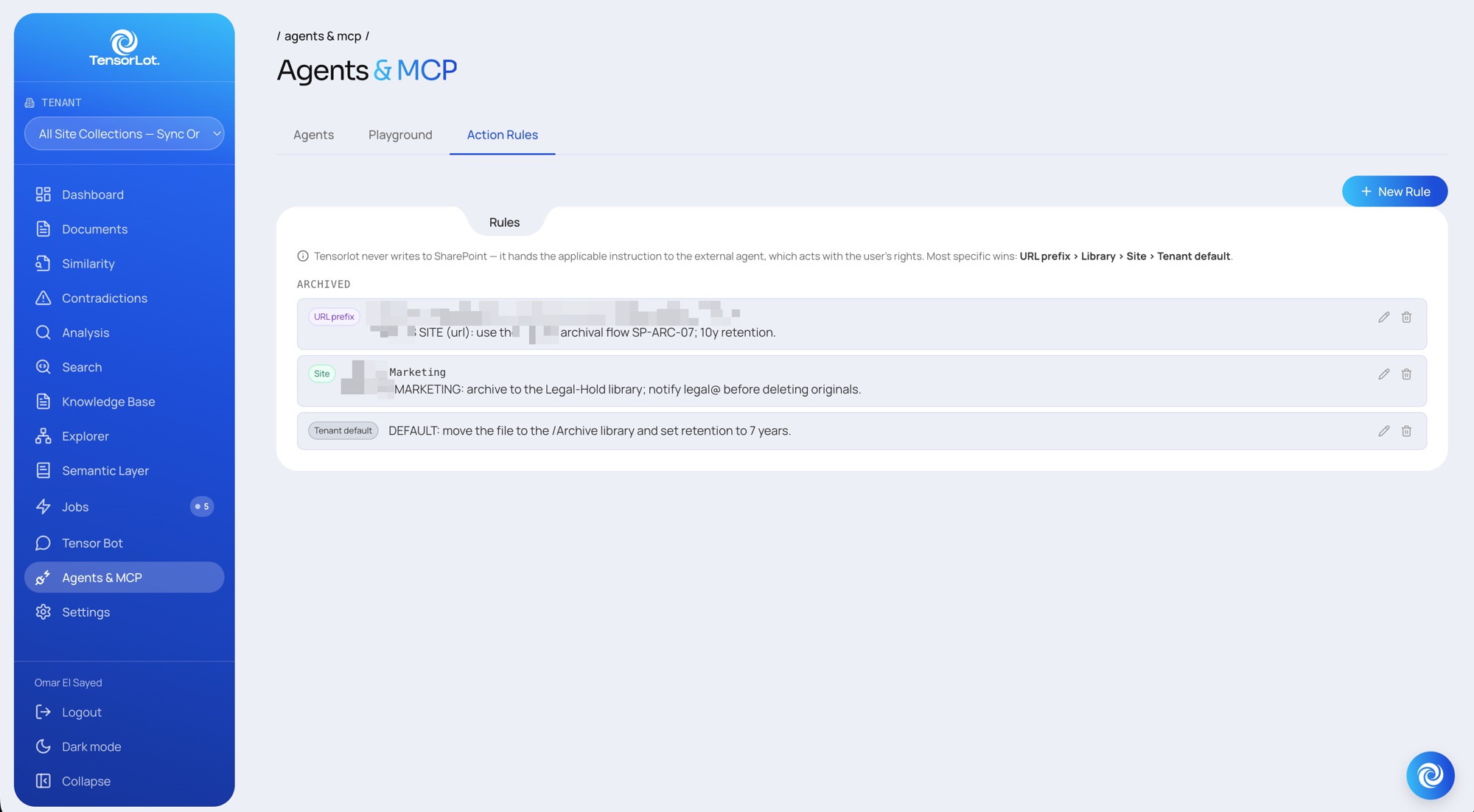
Action Rules · most specific winsconsole / agents & mcp / action rules
TensorLot console — Action Rules: archive rules by URL prefix, site and tenant default

URL prefix › Library › Site › Tenant default — the agent gets the rule, SharePoint stays untouched.

governance & securityGoverned by design.

Every agent is bound to a defined scope and an accountable owner — an agent never sees more than the human behind it.

  • Bound scope: sites, libraries or topics — nothing else
  • Accountable owner per agent, visible on every call
  • Keys expire; revoke access in one click
  • Every call logged with agent, tenant and tool
  • Dry-run first — actions are explicit, never implied
Audit logconsole / agents & mcp / audit
  • ask
    09:41:07 · procurement-bot · acme-group
    ok
  • search_documents
    09:41:05 · procurement-bot · acme-group
    ok
  • list_findings
    09:38:52 · compliance-watchdog · acme-group
    ok
  • set_document_action
    09:38:50 · compliance-watchdog · acme-group
    dry-run
  • get_document
    09:12:13 · onboarding-helper · acme-group
    denied

Every call with agent, tenant and tool — denied calls included.

in practiceOne question, one answer.

01Procurement · Copilot Studio

“Which suppliers deliver taurine — and where are the contracts?”

A procurement agent in Copilot Studio asks TensorLot. It gets the answer with citations from the current, deduplicated supplier documents — not from the 2019 copy in a forgotten site. 10 seconds instead of a morning of searching.

What the agent returned
Sources
3 current contracts
Excluded
2019 duplicate
Tool calls
3
Time
10 s
70%
token usage per answer
11
governed tools
1
endpoint, one key

−70% observed in TensorLot pilot deployments, 2026 — curated context instead of raw document dumps.

next stepReady to give your agents a trustworthy source?

See your own SharePoint answered through MCP — scoped, cited and logged — in a 30-minute demo.