

How Copilot builds an answer — and where it goes wrong
Copilot retrieves the documents most relevant to the question from the content the user may see, puts the best-matching passages into the model’s context, and lets the model write an answer from them. Three things follow. First, retrieval ranks by relevance and recency signals, not by truth — a well-linked 2019 document can outrank the current one. Second, if several documents cover the same topic, the context contains several of them, and the model reconciles them silently. Third, permissions are respected exactly, which means every legacy overshare and every stale copy a user can technically open is a candidate source.
None of this is a defect in Copilot. It is the consequence of grounding an assistant on a corpus that was never curated for machines. Humans compensate automatically — they know the HR copy is the old one. The model does not.
What it looks like in a real tenant
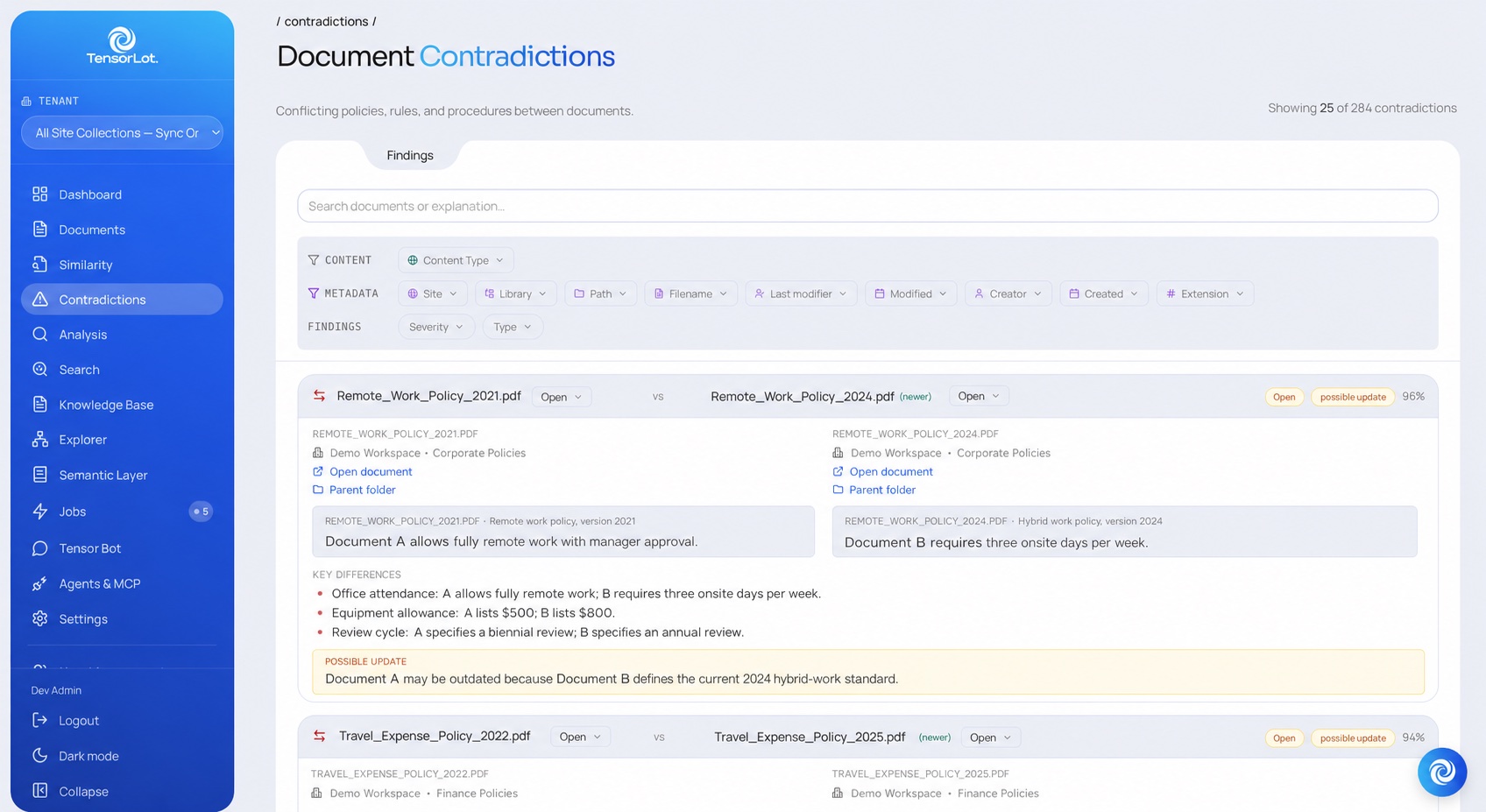
The pattern is measurable. In a mid-sized SharePoint tenant analysed with TensorLot, the console found 284 contradictions — pairs of documents that state different facts about the same subject — and 4,812 findings across 3,206 documents (duplicates, outdated content, contradictions), each with severity, owner and status. The screenshot shows one pair: Remote_Work_Policy_2021 against the 2024 version, the key differences side by side, a confidence score and the verdict “possible update: Document A may be outdated”. Ask Copilot about remote-work rules in that tenant and the answer depends on which of the two it retrieves.
How to diagnose it in your own tenant
- Pick five policy questions your employees ask often (travel expenses, remote work, procurement thresholds, onboarding steps, data retention). Ask Copilot each of them twice, from two different accounts, and compare the cited sources.
- For every answer, open the cited document and check its last-modified date and whether another document on the same topic exists in a different site or library.
- Count how many topics have more than one “current” document. That number — not the model — is your error rate.
- Run a structured analysis: health score per document, contradiction pairs, duplicates, outdated content. TensorLot does this in a 2–4 week proof of concept on your own documents and returns the full quality report.
How to fix it — corpus first, then rules, then citations
- Find the conflicts.. Detect contradictions between documents, duplicates and near-duplicates, and outdated content — as findings with severity and the affected documents, not as a spreadsheet someone fills in by hand. A health score per document and per tenant tells you where you stand and whether it is getting better.
- Decide once, apply everywhere.. Mark the canonical version per topic and let duplicates point at it. Define action rules — what “archive”, “resolve” or “move” means per URL prefix, library, site or tenant; the most specific rule wins — so clean-up stops being a per-document negotiation.
- Act with the right hands.. Remediation is executed by the person or agent who has the rights — TensorLot never writes to SharePoint itself. That keeps ownership where Microsoft’s governance model puts it and makes every action auditable.
- Serve with citations.. Whatever answers — Copilot, Tensor Bot, a Copilot Studio agent via MCP — should point at its sources. A cited answer can be checked in one click; an uncited one has to be trusted.
What Microsoft’s own tooling covers — and what it does not
Microsoft ships governance tooling around Copilot: SharePoint Advanced Management for data-access governance reports, restricted access control and site lifecycle, and Microsoft Purview for sensitivity labels and data-loss prevention. Use them — they address permissions, oversharing and lifecycle, and you have likely already paid for them.
They operate on access and metadata. Whether the travel policy in Finance contradicts the travel policy in HR, which of four onboarding checklists is authoritative, and which documents are quietly out of date are semantic questions about the content itself. That is the layer a consistency analysis adds — and it is the layer that decides whether Copilot’s answers can be trusted.
Copilot and SharePoint — frequently asked questions
Why does Copilot give different answers to the same question?
Because retrieval picks among several documents on the same topic — duplicates, superseded versions, contradicting copies — and which one ranks first varies with wording, recency and permissions. Two users can legitimately see two different “current” policies.
Is a bigger model or a better prompt the fix?
No. A stronger model reconciles contradictory sources more fluently; it cannot know which one is authoritative. That is a property of the corpus and has to be established before retrieval.
Does SharePoint Advanced Management solve this?
SAM covers permissions, oversharing and site lifecycle; Purview covers labels and DLP. Neither analyses whether documents contradict each other or are out of date. Both layers matter before a Copilot rollout.
How do I find the contradictions in my tenant?
With a structured analysis of the content: contradiction pairs with key differences and a verdict, duplicate detection with a canonical candidate, outdated content flagged, a health score per document. TensorLot returns this as a quality report in a 2–4 week proof of concept on your own documents.
Do I have to move or rewrite documents to fix it?
No. Sources are connected read-only; findings and action rules guide the clean-up, and the person or agent with the rights acts. Nothing moves and nothing is rewritten behind anyone’s back.
Does fixing the corpus help beyond Copilot?
Yes. Every assistant, RAG pipeline and agent reads the same documents. A cleaned, cited corpus improves all of them — and reduces their cost: up to 70 % fewer tokens per answer in TensorLot pilot deployments (2026).